03 · Concept
Concept
Mental Model
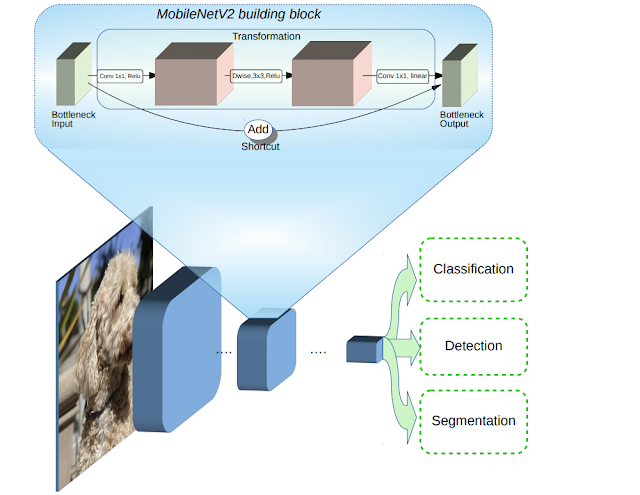
The deployment has three moving parts: model storage in S3, inference execution in Lambda, and public request routing through API Gateway.
01 · Checklist
02 · Context
Deploying pretrained MobileNet V2 model on ImageNet, using serverless open source framework to build and run the application on AWS Lambda and fetch the model from an S3 bucket.
Serverless framework manages all the resources in AWS so you can focus on the application. API endpoints, Lambda functions, CloudFormation stacks, and application packages on S3 are created automatically.
Keep the model artifact outside the Lambda package. Lambda runs the inference code, while S3 stores the heavier traced PyTorch model file.
This article belongs to a learning series on training and serving models for constrained environments such as mobile devices, embedded systems, Jetson Nano, Raspberry Pi, and neural compute sticks. This first step focuses on packaging the model and deploying it into AWS.
03 · Concept
The deployment has three moving parts: model storage in S3, inference execution in Lambda, and public request routing through API Gateway.
04 · Code
Live Demo
Upload a small image and call the AWS Lambda endpoint to classify it with the deployed model.
Choose a PNG, JPEG, or WebP image under 5 MB.
A cold Lambda container can make the first request slow. If the request times out, wait about 90 seconds and try again with a small image.
First, load a pretrained MobileNet V2 model, trace it with a dummy input, and save it as a deployable TorchScript artifact.
2.png)
### Importing the Libraries
import torch
from torchvision import models

### Instancing a pre-trained model will download it's weights to a cache memory
model = models.mobilenet_v2(pretrained = True)

### Deactivating some layers in the model, so that model output it's inferences as expected.
model.eval()

### Trace the model with some dummy input
traced_model = torch.jit.trace(model,torch.randn(1,3,224,224))

### Saving the model
traced_model.save('mobilenet_v2.pt')
### Setting up serverless(sls) with the AWS user credentials
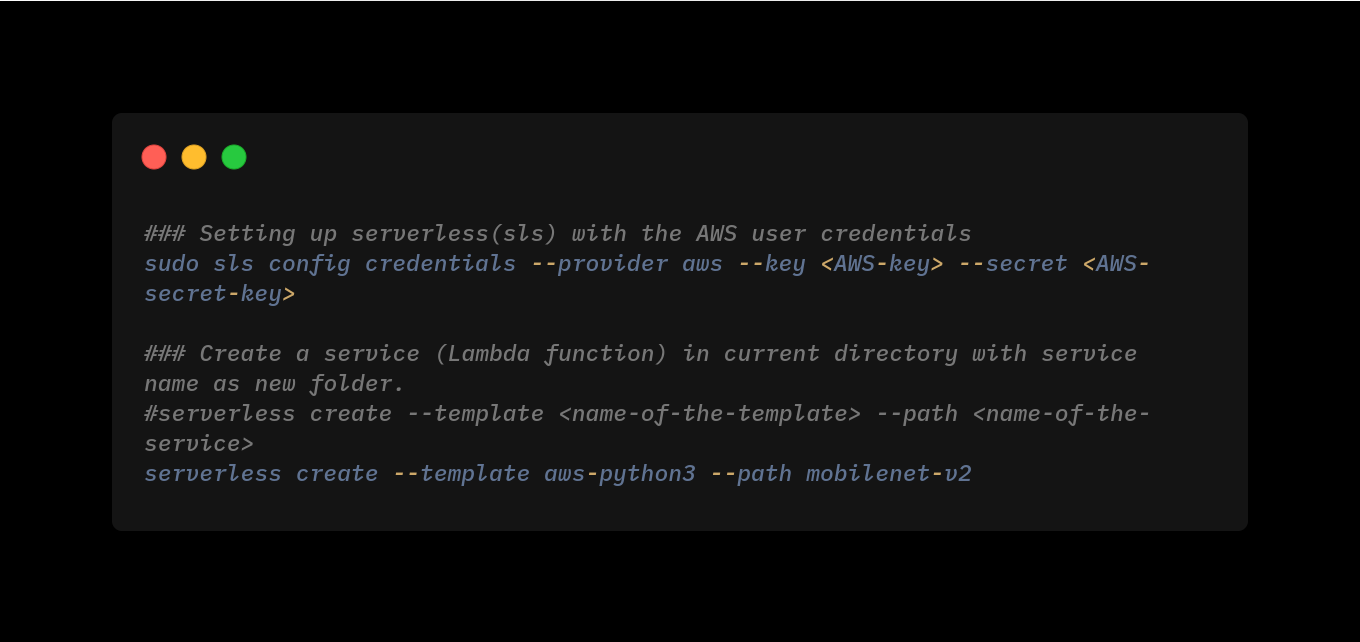
sudo sls config credentials --provider aws --key <AWS-key> --secret <AWS-secret-key>

### Create a service (Lambda function) in current directory with service name as new folder.
#serverless create --template <name-of-the-template> --path <name-of-the-service>
serverless create --template aws-python3 --path mobilenet-v2
After creating the Lambda service, Serverless generates the function folder with files such as handler.py and serverless.yml.
sudo serverless plugin install -n serverless-python-requirements
Change the permission of lambda function folder, run below command inside the folder (mobilenet-v2).if used sudo while creating it.
sudo chown -R $USER:$USER .
A Lambda deployment package cannot exceed AWS package limits. PyTorch can be large, so the packaging strategy matters as much as the inference code.

{
  "name": "mobilenet-v2",
  "description": "",
  "version": "0.1.0",
  "dependencies": {},
  "scipts":{"deploy":"serverless deploy"},
  "devDependencies": {
    "serverless-python-requirements": "^5.1.0"
  }
}
"""Code to download pre-trained pytorch model.
Download the pre-trained model and convert into trace model
"""
try:
    import unzip_requirements
except ImportError:
    pass
from requests_toolbelt.multipart import decoder
import torch
import torchvision
import torchvision.transforms as transforms
from PIL import Image

from torchvision.models import resnet50
from torch import nn

import boto3
import os
import tarfile
import io
import base64
import json
print("Import End")

# define environmental variables if there are not existing
S3_BUCKET = os.environ['S3_BUCKET'] if 'S3_BUCKET' in os.environ else 'name-of-the-bucket'
MODEL_PATH = os.environ['MODEL_PATH'] if 'MODEL_PATH' in os.environ else 'mobilenet_v2.pt'
json_data = os.environ['json_data'] if 'json_data' in os.environ else 'imagenet1000_clsidx_to_labels.json'

print("Downloading the model:")

s3 = boto3.resource('s3')

try:
    if os.path.isfile(MODEL_PATH) != True:
        #get object from s3
        obj = s3.Bucket(S3_BUCKET).Object(MODEL_PATH)
        # read it in memory
        print("creating Bytestream")
        bytestream = io.BytesIO(obj.get()['Body'].read())
        print("Loading Model")
        model = torch.jit.load(bytestream)
        print("Model loaded")

except Exception as e:
    print(repr(e))
    raise(e)

def transform_image(image_bytes):

    """Transform the image for pre-trained model.
    Transform the image which includes resizing, centercrop and normalize.
    Args:
        image_bytes: Input image in bytes
    Returns:
        Tensor
    Raises:
        Except: An error occurred accessing the bytes.
    """
    try:
        transformations = transforms.Compose([
            transforms.Resize(255), # Resnet needed 224  image
            transforms.CenterCrop(224),
            transforms.ToTensor(),
            transforms.Normalize(mean=[0.485, 0.456, 0.406], std=[0.229, 0.224, 0.225])])
        image = Image.open(io.BytesIO(image_bytes))
        return transformations(image).unsqueeze(0) #converted image into batch size of 1
    except Exception as e:
        print(repr(e))
        raise(e)

def imagenet1000_classidx_to_label(class_idx):

    """Convert class index to class labels, Imagenet.
    Converting predicted class index to class labels, Imagenet.
    Args:
        class_idx: str, predicted class index.
    Returns:
        A dict mapping keys to the corresponding table row data
        fetched. Each row is represented as a tuple of strings.
        Returned keys are always bytes.  If a key from the keys argument is
        missing from the dictionary, then that row was not found in the
        table (and require_all_keys must have been False).
    Raises:
        Exception: An error occurred accessing the json file.
    """
    try:
        #content_object = s3.Object(S3_BUCKET,json_data)
        print('Entered into Class prediction level')
        content_object = s3.Bucket(S3_BUCKET).Object(json_data)
        file_content = content_object.get()['Body'].read().decode('utf-8')
        json_content = json.loads(file_content)
        return json_content[class_idx]
    except Exception as e:
        print("Error",repr(e))
        return "Class Not Found"

def get_prediction(image_bytes):

    """Prediction from pre-trained model.
    Inferecing using pre-trained model
    Args:
        image_bytes: Transformed image_bytes
    Returns:
        int, predicted class index from imagenet
    """
    tensor = transform_image(image_bytes=image_bytes)
    return model(tensor).argmax().item()

def classify_image(event, context):

    """Classify image using api.
    Function is called from this template python: handler.py
    Args:
        event: Dictionary containing API inputs
        context: Dictionary
    Returns:
        dictionary: API response
    Raises:
        Exception: Returning API repsonse 500
    """
    try:
        print("Entering into event")
        content_type_header = event['headers']['content-type']
        #print(event['body']) #printing the actual image in hex format
        body = base64.b64decode(event["body"]) #decoding the base64 image
        print("Body loaded")

        picture = decoder.MultipartDecoder(body, content_type_header).parts[0]
        prediction = get_prediction(image_bytes=picture.content)
        print(prediction)

        prediction_label = imagenet1000_classidx_to_label(str(prediction))

        filename = picture.headers[b'Content-Disposition'].decode().split(';')[1].split('=')[1]
        if len(filename) < 4:
            filename = picture.headers[b'Content-Disposition'].decode().split(';')[2].split('=')[1]

        return { #returning the result for the event
            "statusCode": 200,
            "headers": {
                'Content-Type': 'application/json',
                'Access-Control-Allow-Origin': '*',
                "Access-Control-Allow-Credentials": True
                },
            "body": json.dumps({'file': filename.replace('"', ''),'predicted': f"{prediction}, {prediction_label}"})
    }
    except Exception as e:
        print(repr(e))
        return {
            "statusCode": 500,
            "headers": {
                'Content-Type': 'application/json',
                'Access-Control-Allow-Origin': '*',
                "Access-Control-Allow-Credentials": True
            },
            "body": json.dumps({"error": repr(e)})
        }
The above codeblock define as the entry handler function for Lambda. It contains application specific code. Following functions are implemented in this file:
1. S3 bucket and path for model file in S3.
2. Loading of the model and JSON from S3 bucket.
3. Entry handler functions which will be invoke every time AWS Lanbda function is triggered.
4. Processing of incoming image content and using model for image's classification.
service: mobilenet-v2

provider:
  name: aws
  runtime: python3.8
  stage: dev
  region: ap-south-1
  timeout: 60
  environment:
    S3_BUCKET: s3-bucket-name
    MODEL_PATH: mobilenet_v2.pt
  iam:
    role:
      statements:
      - Effect: "Allow"
        Action:
          - s3:getObject
        Resource: arn:aws:s3:::s3-bucket-name/*

custom:
  pythonRequirements:
    dockerizePip: true
    zip: true
    slim: true
    strip: false
    noDeploy:
      - docutils
      - jmespath
      - pip
      - python-dateutil
      - setuptools
      - six
      - tensorboard
    useStaticCache: true
    useDownloadCache: true
    cacheLocation: "./cache"

package:
  patterns:
    - '!package.json'
    - '!package-log.json'
    - '!node_modules/**'
    - '!cache/**'
    - '!test/**'
    - '!__pycache__/**'
    - '!.pytest_cache/**'
    - '!model/**'

functions:
  classify_image:
    handler: handler.classify_image
    memorySize: 3008
    timeout: 60
    events:
      - http:
          path: mobilenetV2-classify
          method: post
          cors: true

plugins:
  - serverless-python-requirements
serverless deploy
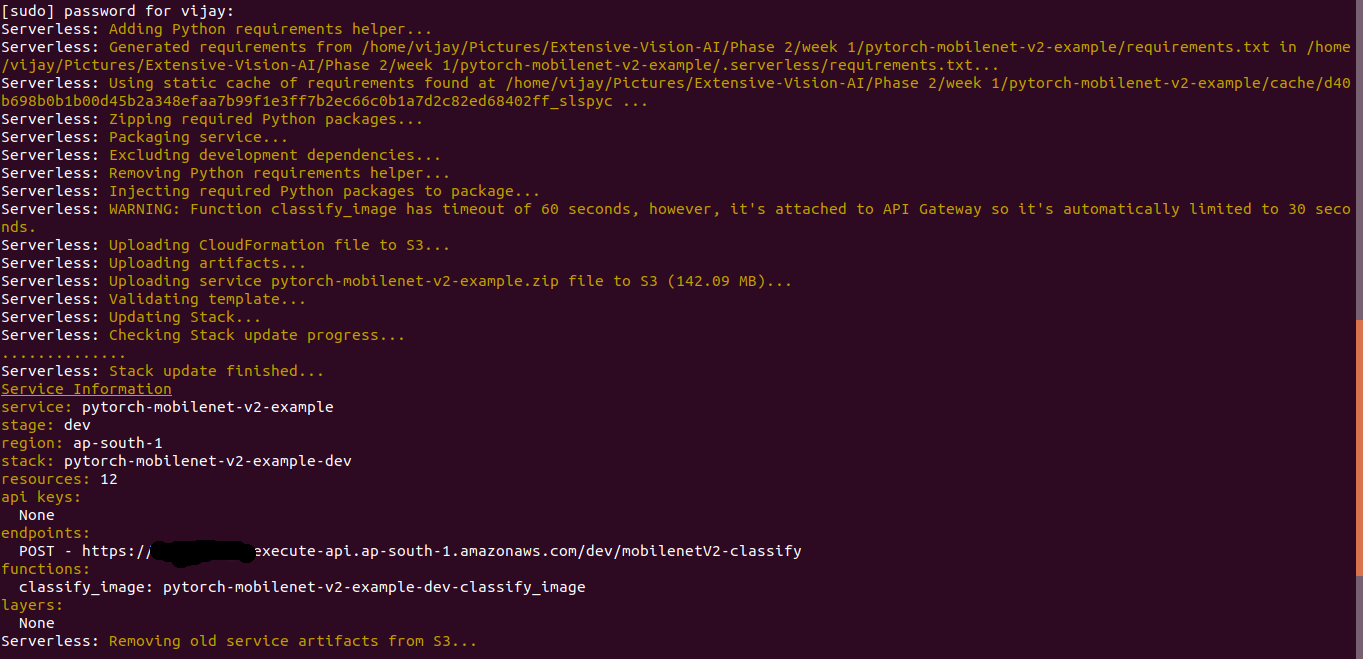
After deployment, Serverless creates the Lambda function, deployment artifacts, CloudFormation resources, and an API Gateway endpoint for inference requests.
We need to allow multipart/form-data content type for the HTTP request and hence visit AWS API gateway console and set "Binary Media Type" as "multipart/form-data"
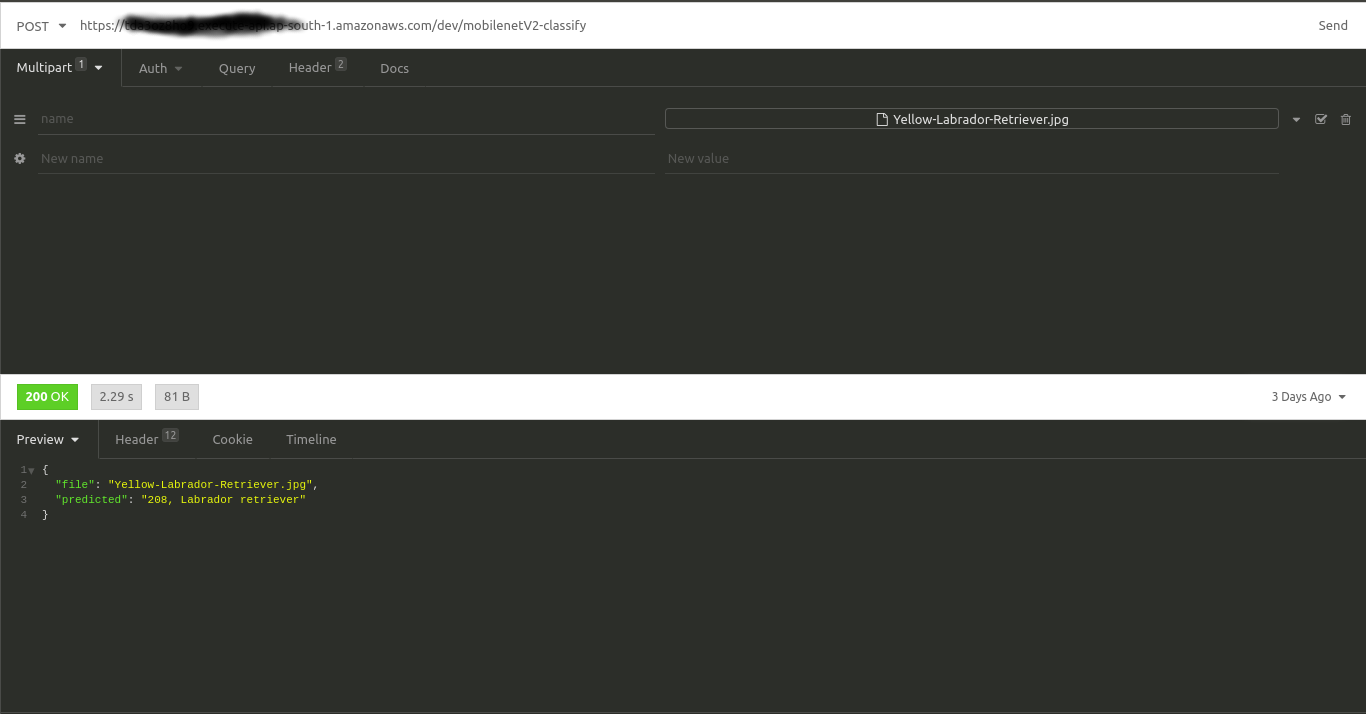
Install Insomnia API tool is used to test the deployment. Invoke API with following configurations:
    HTTP Method: POST

    URL: {generated API link after deployment}

    Content-Type: multipart/form-data

    Select image file for clasification: dog.jpg
05 · Conclusion
Next Improvements
06 · Comments
Comments
Questions, corrections, and deployment notes are welcome.